
Logging in to sites#
This how-to guide shows you how you can use various authentication methods to allow you to login to a site you are trying to archive. This is useful for websites that require a user to be logged in to browse them, or for sites that restrict bots.
In this How-To, we will authenticate on use Twitter/X.com using cookies, and on XXXX using username/password.
Using cookies to authenticate on Twitter/X#
It can be useful to archive tweets after logging in, since some tweets are only visible to authenticated users. One case is Tweets marked as ‘Sensitive’.
Take this tweet as an example: https://x.com/SozinhoRamalho/status/1876710769913450647
This tweet has been marked as sensitive, so a normal run of Auto Archiver without a logged in session will fail to extract the tweet:
>>> auto-archiver https://x.com/SozinhoRamalho/status/1876710769913450647                                                                                     ✭ ✱
 ...
ERROR: [twitter] 1876710769913450647: NSFW tweet requires authentication. Use --cookies,
--cookies-from-browser, --username and --password, --netrc-cmd, or --netrc (twitter) to
 provide account credentials. See https://github.com/yt-dlp/yt-dlp/wiki/FAQ#how-do-i-pass-cookies-to-yt-dlp
 for how to manually pass cookies
[twitter] 1876710769913450647: Downloading guest token
[twitter] 1876710769913450647: Downloading GraphQL JSON
2025-02-20 15:06:13.362 | ERROR    | auto_archiver.modules.generic_extractor.generic_extractor:download_for_extractor:248 - Error downloading metadata for post: NSFW tweet requires authentication. Use --cookies, --cookies-from-browser, --username and --password, --netrc-cmd, or --netrc (twitter) to provide account credentials. See  https://github.com/yt-dlp/yt-dlp/wiki/FAQ#how-do-i-pass-cookies-to-yt-dlp  for how to manually pass cookies
[generic] Extracting URL: https://x.com/SozinhoRamalho/status/1876710769913450647
[generic] 1876710769913450647: Downloading webpage
WARNING: [generic] Falling back on generic information extractor
[generic] 1876710769913450647: Extracting information
ERROR: Unsupported URL: https://x.com/SozinhoRamalho/status/1876710769913450647
2025-02-20 15:06:13.744 | INFO     | auto_archiver.core.orchestrator:archive:483 - Trying extractor telegram_extractor for https://x.com/SozinhoRamalho/status/1876710769913450647
2025-02-20 15:06:13.744 | SUCCESS  | auto_archiver.modules.console_db.console_db:done:23 - DONE Metadata(status='nothing archived', metadata={'_processed_at': datetime.datetime(2025, 2, 20, 15, 6, 12, 473979, tzinfo=datetime.timezone.utc), 'url': 'https://x.com/SozinhoRamalho/status/1876710769913450647'}, media=[])
...
To get round this limitation, we can use cookies (information about a logged in user) to mimic being logged in to Twitter. There are two ways to pass cookies to Auto Archiver. One is from a file, and the other is from a browser profile on your computer.
In this tutorial, we will export the Twitter cookies from our browser and add them to Auto Archiver
1. Installing a cookie exporter extension
First, we need to install an extension in our browser to export the cookies for a certain site. The FAQ on yt-dlp provides some suggestions: Get cookies.txt LOCALLY for Chrome or cookies.txt for Firefox.
2. Export the cookies
Note
See the note here on why you shouldn’t use your own personal account for archiving.
Once the extension is installed in your preferred browser, login to Twitter in this browser, and then activate the extension and export the cookies. You can choose to export all your cookies for your browser, or just cookies for this specific site. In the image below, we’re only exporting cookies for Twitter/x.com:
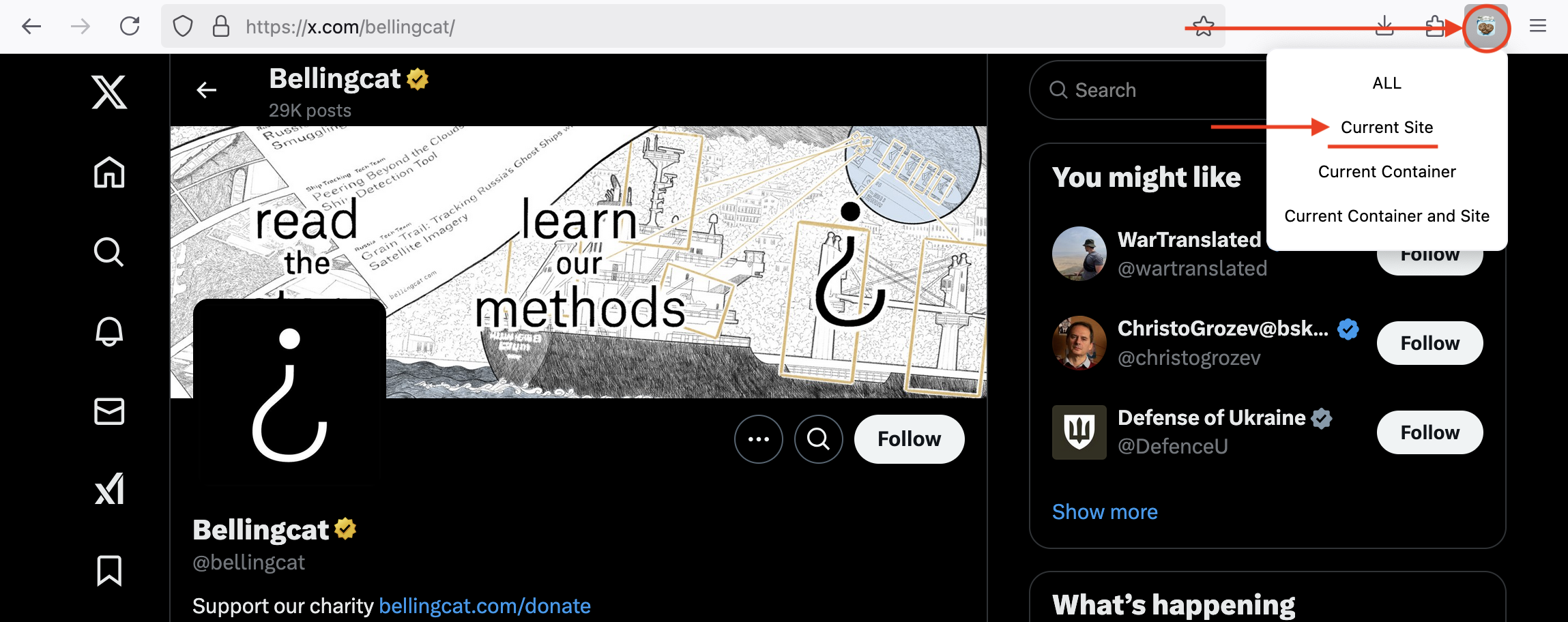
3. Adding the cookies file to Auto Archiver
You now will have a file called cookies.txt (tip: name it twitter_cookies.txt if you only exported cookies for Twitter), which needs to be added to Auto Archiver.
Do this by going into your Auto Archiver configuration file, and editing the authentication section. We will add the cookies_file option for the site x.com,twitter.com.
Note
For websites that have multiple URLs (like x.com and twitter.com) you can ‘reuse’ the same login information without duplicating it using a comma separated list of domain names.
I’ve saved my twitter_cookies.txt file in a secrets folder, so here’s how my authentication section looks now:
...

authentication:
   x.com,twitter.com:
      cookies_file: secrets/twitter_cookies.txt
...
4. Re-run your archiving with the cookies enabled
Now, the next time we re-run Auto Archiver, the cookies from our logged-in session will be used by Auto Archiver, and restricted/sensitive tweets can be downloaded!
>>> auto-archiver https://x.com/SozinhoRamalho/status/1876710769913450647                                                                                   ✭ ✱ ◼
...
2025-02-20 15:27:46.785 | WARNING  | auto_archiver.modules.console_db.console_db:started:13 - STARTED Metadata(status='no archiver', metadata={'_processed_at': datetime.datetime(2025, 2, 20, 15, 27, 46, 785304, tzinfo=datetime.timezone.utc), 'url': 'https://x.com/SozinhoRamalho/status/1876710769913450647'}, media=[])
2025-02-20 15:27:46.785 | INFO     | auto_archiver.core.orchestrator:archive:483 - Trying extractor generic_extractor for https://x.com/SozinhoRamalho/status/1876710769913450647
[twitter] Extracting URL: https://x.com/SozinhoRamalho/status/1876710769913450647
...
2025-02-20 15:27:53.134 | INFO     | auto_archiver.modules.local_storage.local_storage:upload:26 - ./local_archive/https-x-com-sozinhoramalho-status-1876710769913450647/06e8bacf27ac4bb983bf6280.html
2025-02-20 15:27:53.135 | SUCCESS  | auto_archiver.modules.console_db.console_db:done:23 - DONE Metadata(status='yt-dlp_Twitter: success',
metadata={'_processed_at': datetime.datetime(2025, 2, 20, 15, 27, 48, 564738, tzinfo=datetime.timezone.utc), 'url':
'https://x.com/SozinhoRamalho/status/1876710769913450647', 'title': 'ignore tweet, testing sensitivity warning nudity https://t.co/t3u0hQsSB1',
...
Finishing Touches#
You’ve now successfully exported your cookies from a logged-in session in your browser, and used them to authenticate with Twitter and download a sensitive tweet. Congratulations!
Finally,Some important things to remember:
It’s best not to use your own personal account for archiving. Here’s why.
Cookies can be short-lived, so may need updating. Sometimes, a website session may ‘expire’ or a website may force you to login again. In these instances, you’ll need to repeat the export step (step 2) after logging in again to update your cookies.
Authenticating on XXXX site with username/password#
Note
This section is still under construction 🚧
Proof of Origin Tokens#
YouTube uses Proof of Origin Tokens (POT) as part of its bot detection system to verify that requests originate from valid clients. If a token is missing or invalid, some videos may return errors like “Sign in to confirm you’re not a bot.”
yt-dlp provides a detailed guide to POTs.
How Auto Archiver Uses POT#
This feature is enabled for the Generic Archiver via two yt-dlp plugins:
Client-side plugin: yt-dlp-get-pot
Detects when a token is required and requests one from a provider.Provider plugin: bgutil-ytdlp-pot-provider
Includes both a Python plugin and a Node.js server or script to generate the token.
These are installed in our Poetry environment.
Integration Methods#
Docker (Recommended):
When running the Auto Archiver using the Docker image, we use the Node.js token generation script. This is to avoid managing a separate server process, and is handled automatically inside the Docker container when needed.
This is already included in the Docker image, however if you need to disable this you can set the config option bguils_po_token_method under the generic_extractor section of your orchestration.yaml config file to “disabled”.
generic_extractor:
  bguils_po_token_method: "disabled"
PyPi/ Local:
When using the Auto Archiver PyPI package, or running locally, you will need additional system requirements to run the token generation script, namely either Docker, or Node.js and Yarn.
See the bgutil-ytdlp-pot-provider documentation for more details.
⚠️WARNING⚠️: This will add the server scripts to the home directory of wherever this is running.
You can set the config option
bguils_po_token_methodunder thegeneric_extractorsection of yourorchestration.yamlconfig file to “script” to enable the token generation script process locally.Alternatively you can run the bgutil-ytdlp-pot-provider server separately using their Docker image or Node.js server.
Notes#
The token generation script is only triggered when needed by yt-dlp, so it should have no effect unless YouTube requests a POT.
If you’re running the Auto Archiver in Docker, this is set up automatically.
If you’re running locally, you’ll need to run the setup script manually or enable the feature in your config.
You can set up both the server and the script, and the plugin will fallback on each other if needed. This is recommended for robustness!
Configurations:#
Configurations Summary#
Option |
Behavior |
Docker Default? |
|---|---|---|
|
Docker: Automatically downloads and uses the token generation script. Local: Does nothing; assumes a separate server is running externally. |
✅ Yes |
|
Explicitly downloads and uses the token generation script, even locally. |
❌ No |
|
Disables token generation completely. |
❌ No |
Example configuration:
generic_extractor:
  # ...
  bguils_po_token_method: "script"
  # For debugging add the verbose flag here:
  ytdlp_args: "--no-abort-on-error --abort-on-error --verbose"
Advanced Configuration:
If you change the default port of the bgutil-ytdlp-pot-provider server, you can pass the updated values using our extractor_args option for the gereric extractor.
generic_extractor:
  ytdlp_args: "--no-abort-on-error --abort-on-error --verbose"
  ytdlp_update_interval: 5
  bguils_po_token_method: "script"
  extractor_args:
    youtube:
      getpot_bgutil_baseurl: "http://127.0.0.1:8080"
      player_client: web,tv
For more details on this for bgutils see here
Checking the logs#
To verify that the POT process working, look for the following lines in your log after adding the config option:
[GetPOT] BgUtilScript: Generating POT via script: /Users/you/bgutil-ytdlp-pot-provider/server/build/generate_once.js
[debug] [GetPOT] BgUtilScript: Executing command to get POT via script: /Users/you/.nvm/versions/node/v20.18.0/bin/node /Users/you/bgutil-ytdlp-pot-provider/server/build/generate_once.js -v ymCMy8OflKM
[debug] [GetPOT] BgUtilScript: stdout:
{"poToken":"MlMxojNFhEJvUzGeHEkVRSK_luXtwcDnwSNIOgaUutqB7t99nmlNvtWgYayboopG6ZopZgmQ-6PJCWEMHv89MIiFGGlJRY25Fkwzxmia_8uYgf5AWf==","generatedAt":"2025-03-26T10:45:26.156Z","visitIdentifier":"ymCMy8OflKM"}
[debug] [GetPOT] Fetching gvs PO Token for tv client
If it can’t find the script or something, you’ll see something like this:
[debug] [GetPOT] Fetching player PO Token for tv client
WARNING: [GetPOT] BgUtilScript: Script path doesn't exist: /Users/you/bgutil-ytdlp-pot-provider/server/build/generate_once.js. Please make sure the script has been transpiled correctly.
WARNING: [GetPOT] BgUtilHTTP: Error reaching GET http://127.0.0.1:4416/ping (caused by TransportError). Please make sure that the server is reachable at http://127.0.0.1:4416.
[debug] [GetPOT] No player PO Token provider available for tv client
In this case check that the script has been transpiled correctly and is available at the path specified in the log, or that the server is running and reachable.